
3 November 2026
Why is a website slow and how to check it yourself
A slow site loses the visitor before they see the offer. Where the delay comes from (hosting, images, plugins, third-party scripts), how to measure it in five minutes with PageSpeed Insights, and which fixes give the most for the least work.
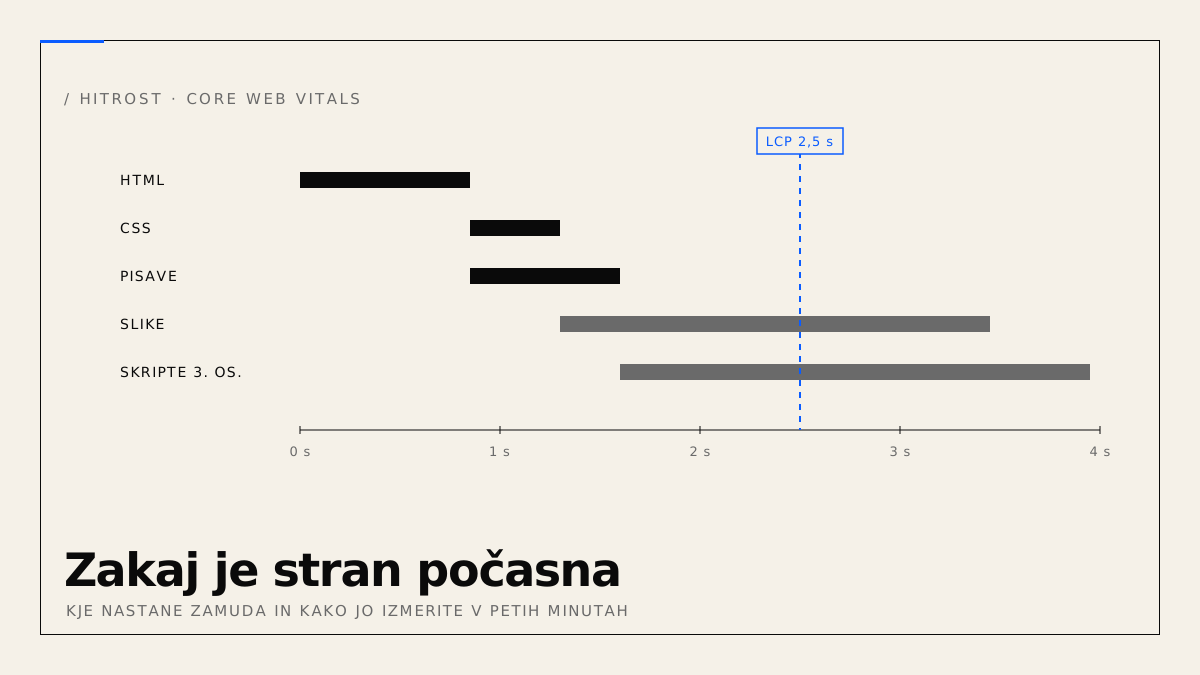
A visitor who waits more than a few seconds closes the tab and opens the next provider from the search results. Google measures speed itself and uses it when ranking on mobile. Below is a breakdown of where the delay on a typical site comes from, how to measure it without technical knowledge, and in which order to tackle the fixes.
Why is a website slow?
Most often because of four things, usually at the same time: a slow server response on shared hosting, oversized images, too many plugins and third-party scripts, and no caching. Rarely is the cause a single mistake. It is usually a sum of decisions, each of which looks harmless on its own.
Server and hosting
The first part of the delay happens before the browser receives the first byte of HTML. WordPress without caching assembles the page on every visit: it starts PHP, runs dozens of database queries and only then sends a response. On shared hosting, where one server is split between hundreds of sites, this takes from half a second to several seconds. The visitor sees a blank screen the whole time.
Images
According to HTTP Archive measurements, images are the single largest share of bytes transferred on a typical page. The most common mistake is a phone photo at its original 4000-pixel resolution, displayed in an 800-pixel-wide frame. The browser downloads several megabytes and then shrinks them. With ten such images on the homepage, that is more than an entire custom-built site put together.
Plugins and third-party scripts
Every WordPress plugin can add its own CSS and JavaScript to every page, even if it is only used on one subpage. On top of that come external scripts: analytics, advertising pixels, chat, embedded YouTube, Google Fonts, the cookie banner. Each one requires a DNS lookup, a connection, a download and execution. Running JavaScript occupies the browser's main thread, so the page responds with a lag even after it appears to have loaded.
Caching
Without caching, everything above repeats on every visit. With caching, the server assembles the HTML once and then returns it as a file, and the browser reuses images, CSS and scripts from the previous visit. A content delivery network (CDN) adds to this by serving files from a data centre near the visitor instead of from a single server.
How do you measure website speed?
Open PageSpeed Insights, enter the address of your homepage and wait about a minute. You get a score from 0 to 100 for mobile and desktop, plus four measurements that Google calls Core Web Vitals. Look at mobile first, because it is almost always worse and because Google ranks by it.
| Metric | Good result | What it measures |
|---|---|---|
| LCP | up to 2.5 s | time until the largest visible element appears, usually the main image or heading |
| INP | up to 200 ms | how quickly the page responds to a click or tap |
| CLS | up to 0.1 | how much the content shifts while loading |
| TTFB | up to 0.8 s | time until the server sends the first byte of the response |
The report has two parts. At the top is data from real Chrome visitors over the last 28 days, if the site has enough of them. Below is a lab measurement made when you ran the test. If the two differ, trust the top part. Repeat the test two or three times, because a single result varies with the server's load at that moment.
For details on what loads and in which order, use WebPageTest. It shows every file as a row on a timeline. The long rows are the images or scripts to look at first.
Which fixes give the most?
By effect relative to effort, top to bottom:
- Images. Resize them to the size actually displayed, convert to WebP or AVIF, and add lazy loading for images below the fold. On most sites this alone removes more than half of the transferred bytes.
- Caching. On WordPress, a page-caching plugin and putting the site behind a CDN such as Cloudflare. TTFB drops from seconds to a few hundred milliseconds without changing hosting.
- Third-party scripts. For each one, ask who looks at its data. A pixel for ads you no longer run and a chat nobody answers can be removed today.
- Plugins. Deactivate the ones you do not use, and check whether any of them loads on every page something that is only needed on one.
- Fonts. At most two families, hosted on your own domain, set so the browser shows a fallback font while loading.
What does not help: plugins that promise a score of 100 in one click. They mostly combine and compress files, which is useful, but they also defer scripts in a way that breaks forms or sliders. The score goes up and the visitor gets a page that does not work.
When is it cheaper to rebuild the site?
When the site is made with a page builder, has more than twenty plugins, and does not get past 50 on mobile even after the fixes. At that point the delay is built into the foundation and every fix holds only until the next theme update.
A static site on Cloudflare, as described in WordPress or a custom-built website, removes the first two causes entirely. The HTML is assembled before publishing and served from a data centre near the visitor, with no PHP and no database. Images and scripts remain, but they are controlled at build time rather than by each plugin separately.
If the site stays on WordPress, speed belongs in regular maintenance. The Standard and Premium tiers on the services page include performance monitoring, so a drop after a plugin update is noticed by the maintainer and not by the customer.
Run PageSpeed Insights on your homepage in mobile view. If LCP is above 2.5 s and the first two items on the list do not help, send the site address and a screenshot of the report through the website brief. Within one working day you get an assessment of whether to fix or rebuild.